I used to feel a little overwhelmed whenever I tried to keep track of my activities in Google Calendar.
For example, if I did several different things during the day, I thought I had to create separate calendar events like this:
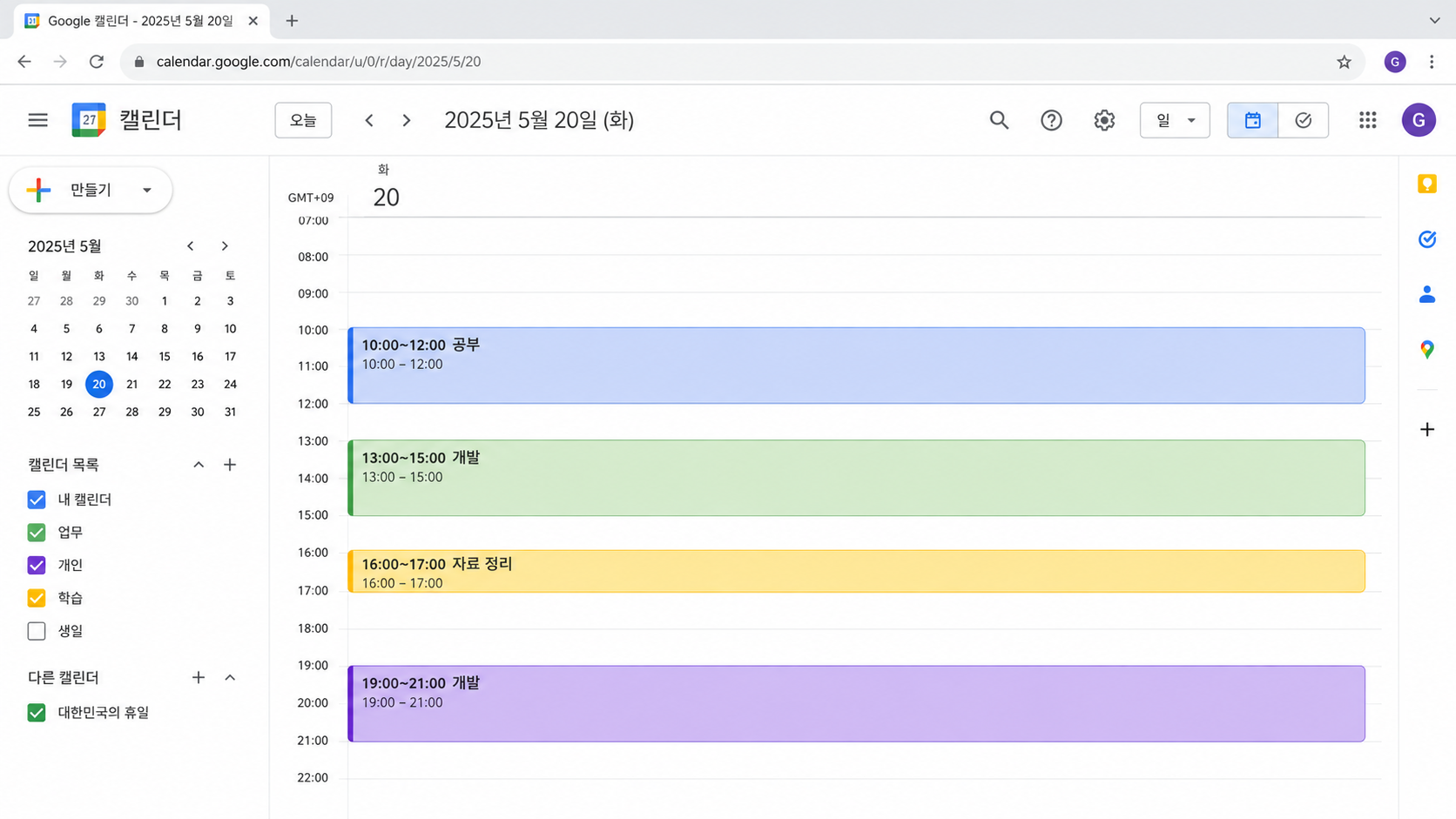
Creating a title, setting the time, and saving each event one by one became more tedious than I expected.
At first, I tried to keep up with it, but over time I gradually stopped recording things.
Recently, however, the way I use Google Calendar has changed quite a bit because I started using it together with AI.
The basic idea is very simple.
I keep the recording process easy for myself and let AI handle the classification and calculations later.
I Keep One Daily Record Instead of Creating Many Separate Events
These days, I do not create a separate calendar event for every single thing I do.
Instead, I create one all-day event such as daily summary and keep adding what I actually did during the day, organized by time.
For example:
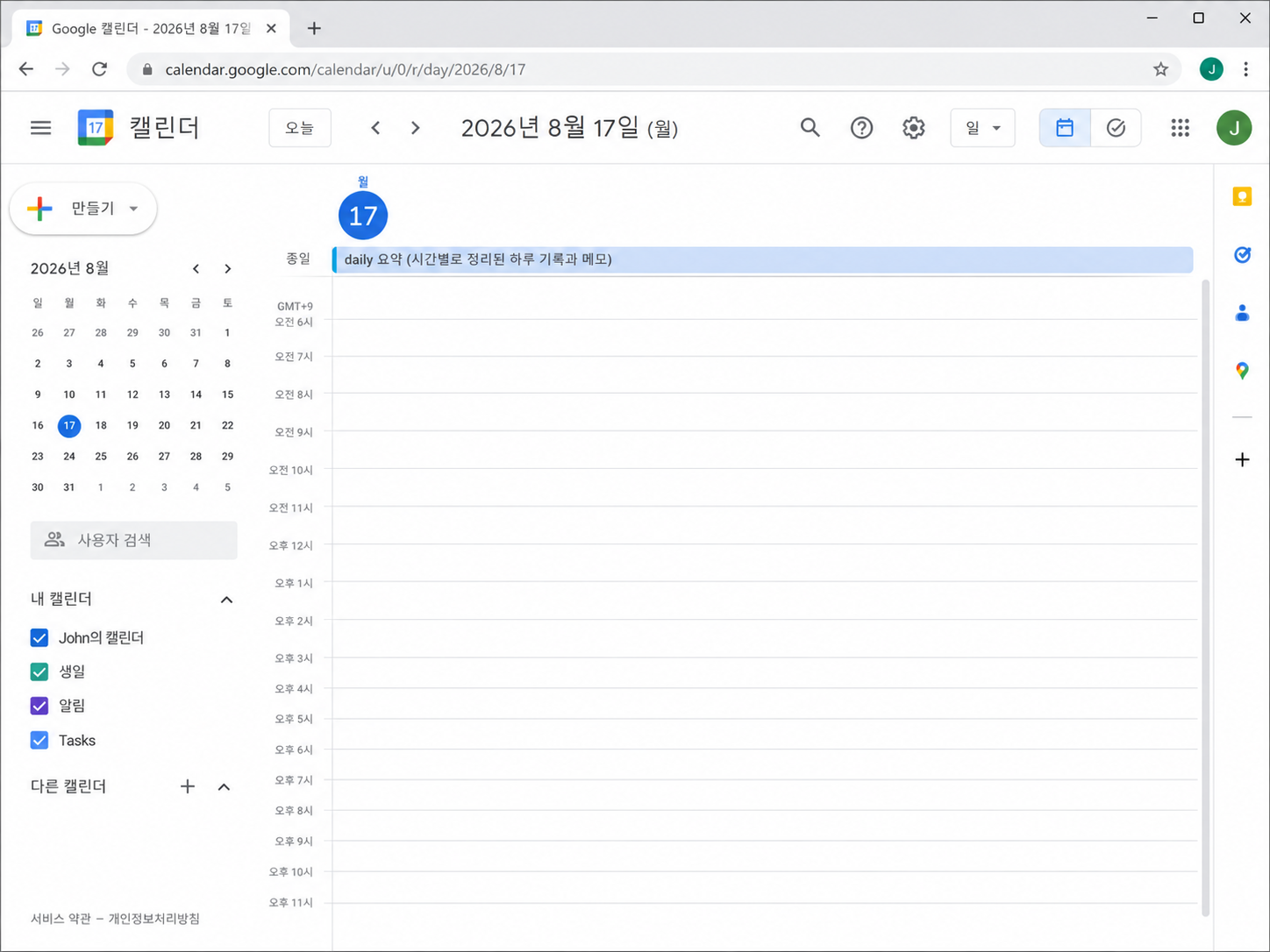
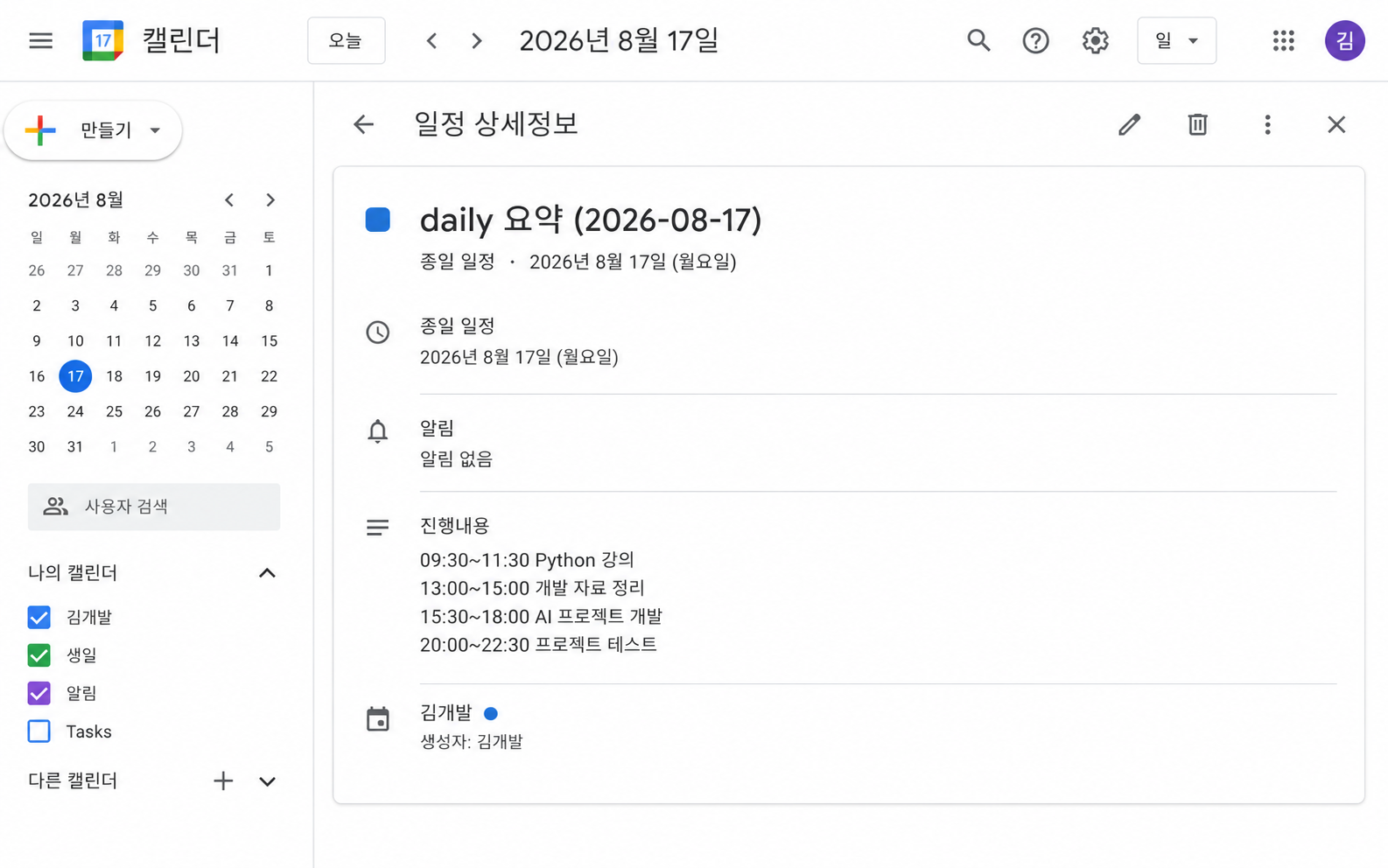
Even with a simple record like this, AI can later read the contents and classify much of the information.
The important point is not to create a complicated format, but to record the time ranges as clearly as possible.
I Let AI Calculate the Time Later
Once several days of calendar records have accumulated, I can ask AI questions about them.
For example:
How many hours did I spend on development this week?AI can check the calendar records, identify the time periods related to development, and add them up.
I can also ask:
Separate my study time and development time for this week.Depending on what I recorded, AI can also analyze things such as:
- Development time
- Study time
- Time spent on each project
- Time spent organizing materials
- Personal activities
- Sleep time
- Daily or weekly activity levels
I do not have to structure everything perfectly from the beginning.
I Separate the Roles of the Person Recording and the AI Organizing
This is probably the part I find most convenient about this method.
With the traditional approach, the person had to do both the recording and the structuring.
Person

Create an event
→ Decide the category
→ Enter the start time
→ Enter the end time
→ Write a title
→ Save each event separately
When AI is involved, the roles can be divided.
Person

Simply record what was done and when

        ↓

AI

Read the contents
→ Calculate time
→ Classify activities
→ Add up the totals
→ Create a weekly summary
The important job for the person is to keep leaving records consistently, while repetitive organization can be handled by AI.
This difference is bigger than it may seem.
Consistent Data Has Been More Useful Than Perfect Data
At first, I thought that if I wanted to use data effectively, I had to structure it perfectly from the moment I entered it.
But doing that can make the recording process itself too inconvenient.
Especially when I do many different things in one day, creating a separate event for every activity can become quite tedious.
By comparison, writing the time and activity inside one daily record feels much easier.
15:30~17:00 Review Development Ideas and Organize Materials
17:00~22:00 Project Development
22:00~23:00 Organize Development Notes
This is easy enough for a person to write, while still giving AI enough information to analyze later.
In the end, I realized that what matters more to me is:
a few months of consistently accumulated records, even if they are slightly loose in format, rather than a few days of perfectly structured records.
I Separate Calendar Time from Actual Focus Time
There is one thing to keep in mind.
If my calendar says that I spent three hours on development, that does not necessarily mean I spent all three hours working without interruption.
I may have taken a bathroom break, grabbed a coffee, or briefly done something else.
So I think it is better to distinguish between two types of time.
Calendar-recorded time
= the total time set aside for that activity

Focused time
= the estimated amount of time actually spent concentrating on the task
For example, if my calendar shows 40 hours of development-related activity, I do not automatically interpret that as 40 hours of uninterrupted focus.
If I also give AI this kind of rule, the analysis can become more realistic.
It Becomes More Useful When I Look at It Weekly
Looking at a full week of accumulated data is much more useful than looking at just one day.
For example, I can ask AI:
What activity did I spend the most time on this week?Or:
Show my project development time by day for this week.At that point, the calendar becomes more than just a schedule.
It becomes a way to see how I actually spent my time.
I may have planned to spend most of my time developing, but the records could show that I actually spent more time organizing materials.
The opposite could also happen.
Looking at real records is much more accurate than relying on memory.
Over Time, the Calendar Becomes Personal Activity Data
If I continue using this method, Google Calendar can become more than just a scheduling tool.
I currently think of the roles of my tools roughly like this:
Google Calendar
→ When did I do something?
→ How much time did I spend on it?

Obsidian
→ What did I do during development?
→ What problems did I encounter and how did I solve them?

Notion
→ Organized project information
→ Reviewed documents and plans

AI
→ Search and analyze all of this data
Rather than trying to store everything in one tool, I give each tool a different role.
Google Calendar is especially useful for keeping track of time and activity.
In the Future, I Think I Will Be Able to Ask Even More Questions
Once enough data has accumulated, I expect that I will be able to do more than simply add up hours.
For example:
Changes in development time over the last three months

Actual time spent on each project

Planned work versus actual execution

Average study time

Relationship between sleep time and workload

Completed and discontinued projects

How long I studied a specific technology
At that point, Google Calendar starts functioning like a kind of personal activity log database.
The Way We Record Information May Change in the AI Era
In the past, computers could not understand context very well, so people had to enter information in a highly structured format from the beginning.
AI can now understand natural language to some extent.
Because of that, I think it may become increasingly useful to:
record information in a way that is convenient for people, and let AI structure it later.
I used to think that I had to create every Google Calendar event separately, which made the whole process feel too tedious.
Now I simply record what I did during the day with clear time ranges and let AI handle much of the analysis later.
That has made the process much easier.
More importantly, I have actually started accumulating records consistently.
I have not been using this method for a very long time yet, but so far I am quite satisfied with it.
As more data accumulates, I plan to analyze things such as monthly development time and the actual amount of time I spend on each project.
A Quick Summary of How I Use It
1. Create one daily Calendar record.

2. Keep adding what I did during the day, organized by time.

3. Do not create a separate event for every activity.

4. Record the time ranges as clearly as possible.

5. Later, ask AI to check the Calendar.

6. Let AI classify activities such as study, development, and personal tasks.

7. Calculate daily, weekly, and monthly time.

8. Distinguish calendar-recorded time from actual focused time.
The simplest conclusion I have reached is this:
Tracking should be simple enough that I can keep doing it consistently.
Then I can let AI handle the tedious classification and calculations.
I see this as one way of using AI not just as a tool that answers questions, but as a tool that can read, organize, and analyze the data I have accumulated over time.
'개발과 프로젝트 (Dev & Project) > AI 활용' 카테고리의 다른 글
| 구글 캘린더를 AI와 함께 쓰니 기록이 쉬워졌습니다 (0) | 2026.08.17 |
|---|---|
| ChatGPT, Claude, Gemini는 내 Notion·구글드라이브·옵시디언을 얼마나 다룰 수 있을까? (0) | 2026.08.07 |


댓글